一. 这次针对共享jar目录对tomcat classloader调研,大概有以下两种解决方案。#
二. Tomcat6.x+ 向前兼容性 和 Delegate“开关”#
Tomcat6.x+ 向前兼容性
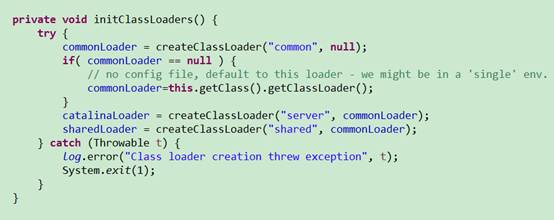
原理:tomcat6.x+为了用户的使用简化了tomcat5.x的classloader模型,但用户也能通过修改配置中的server.loader和shared.loader重新启用5.x的加载器结构。
server.loader下的jar文件只能由tomcat访问, 对应用不可见。
shared.loader下的jar文件能被各个应用共享访问,对tomcat不可见。
配置:
catalina.properites中的server.loader和shared.loader, 配置为jar所在的目录
代码:
Delegate“开关”
原理:tomcat6x+后默认Delegate为false,意味是打破java默认的双亲委派规则的。也就是说默认是child first的, 先加载webapp自身的jar文件。如果置Delegate=true,优先委派双亲加载(parent first)。
配置:
- Defining a context(3中方式,两种方式略)
Inside a Host element in the main conf/server.xml.
- Loader delegate=”true”
Loader - Configure the web application class loader that will be used to load servlet and bean classes for this web application. Normally, the default configuration of the class loader will be sufficient.
1 | Eg. <context docBase="…"> <Loader delegate="true" /> … </context> |
注意点:
- Tomcat6.X 和Tomcat7. X,8. X的加载顺序有一点不同
源代码: WebappClassLoader.loadClass ?
1)7. X比6. X多并发load class的功能。
- X里 Bootstrap classLoader先加载class, 6. X里 System classLoader先加载class
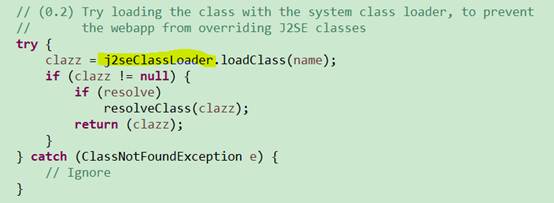
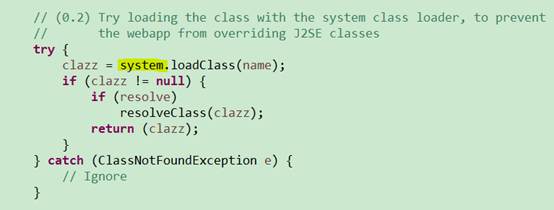
Tomcat6.X
Delegate=false 的加载顺序
Bootstrap classes of your JVM
System class loader classes
/WEB-INF/classes of your web application
/WEB-INF/lib/*.jar of your web application
Common class loader classes
Delegate=true 的加载顺序
Bootstrap classes of your JVM
System class loader classes
Common class loader classes
/WEB-INF/classes of your web application
/WEB-INF/lib/*.jar of your web application
Tomcat7.X,8.X
Delegate=false 的加载顺序
Bootstrap classes of your JVM
/WEB-INF/classes of your web application
/WEB-INF/lib/*.jar of your web application
System class loader classes
Common class loader classes
Delegate=true 的加载顺序
Bootstrap classes of your JVM
System class loader classes (described above)
Common class loader classes (described above)
/WEB-INF/classes of your web application
/WEB-INF/lib/*.jar of your web application
- packageTriggers变量
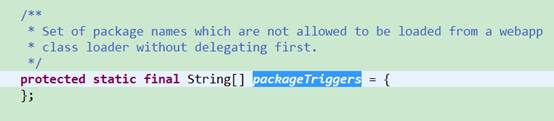

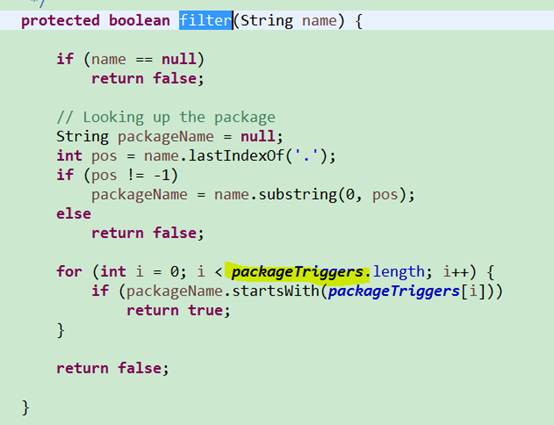
packageTriggers,执行child first时,排除的package列表,如果匹配了package,即时为delegate=false,也会优先执行parent first策略。
但是这个变量没有作为tomcat配置项, 这个功能没有暴露出来。
三. WebappClassLoader加载指定目录的jar文件#
每个应用可以加载指定目录的jar,虽然灵活,但是配置相对复杂,对应用的入侵性比较大,不推荐使用。 具体见参考文档。
总结: tomcat6x+ 向前兼容性 和 Delegate“开关”这种方式对应用的入侵性比较小,应用改动比较少。
附:验证 detector:
Delegate 没配置, shared 目录配置了
1 |
|

Delegate 配置了, shared 目录配置了
1 | computing per loader stat ..done. |

参考:#
- The Loader Component
- The Context Container
- 主流web容器(jetty,tomcat,jboss)的classloader机制对比和相关问题分析
- Tomcat源码分析之ClassLoader部分的设计详细分析 tomcat8.0
- class卸载、热替换和Tomcat的热部署的分析
- 应用Tomcat的WebappClassLoader加载指定目录的jar文件
- tomcat6.0和7.0的源代码
Btw: WatchedResource - The auto deployer will monitor the specified static resource of the web application for updates, and will reload the web application if it is updated. The content of this element must be a string.