Approach[1] #
Our method takes as input a few images (typically 3-5 images suffice, based on our experiments) of a subject (e.g., a specific dog) and the corresponding class name (e.g. “dog”), and returns a fine-tuned/“personalized’’ text-to-image model that encodes a unique identifier that refers to the subject. Then, at inference, we can implant the unique identifier in different sentences to synthesize the subjects in difference contexts. 我们的方法将主题(例如,特定的狗)和相应的类名称(例如“狗”)的一些图像(根据我们的实验,通常 3-5 个图像就足够了)作为输入,并返回一个微调/ “个性化”文本到图像模型,编码指向主题的唯一标识符。然后,在推理时,我们可以将唯一标识符植入不同的句子中,以合成不同上下文中的主题。
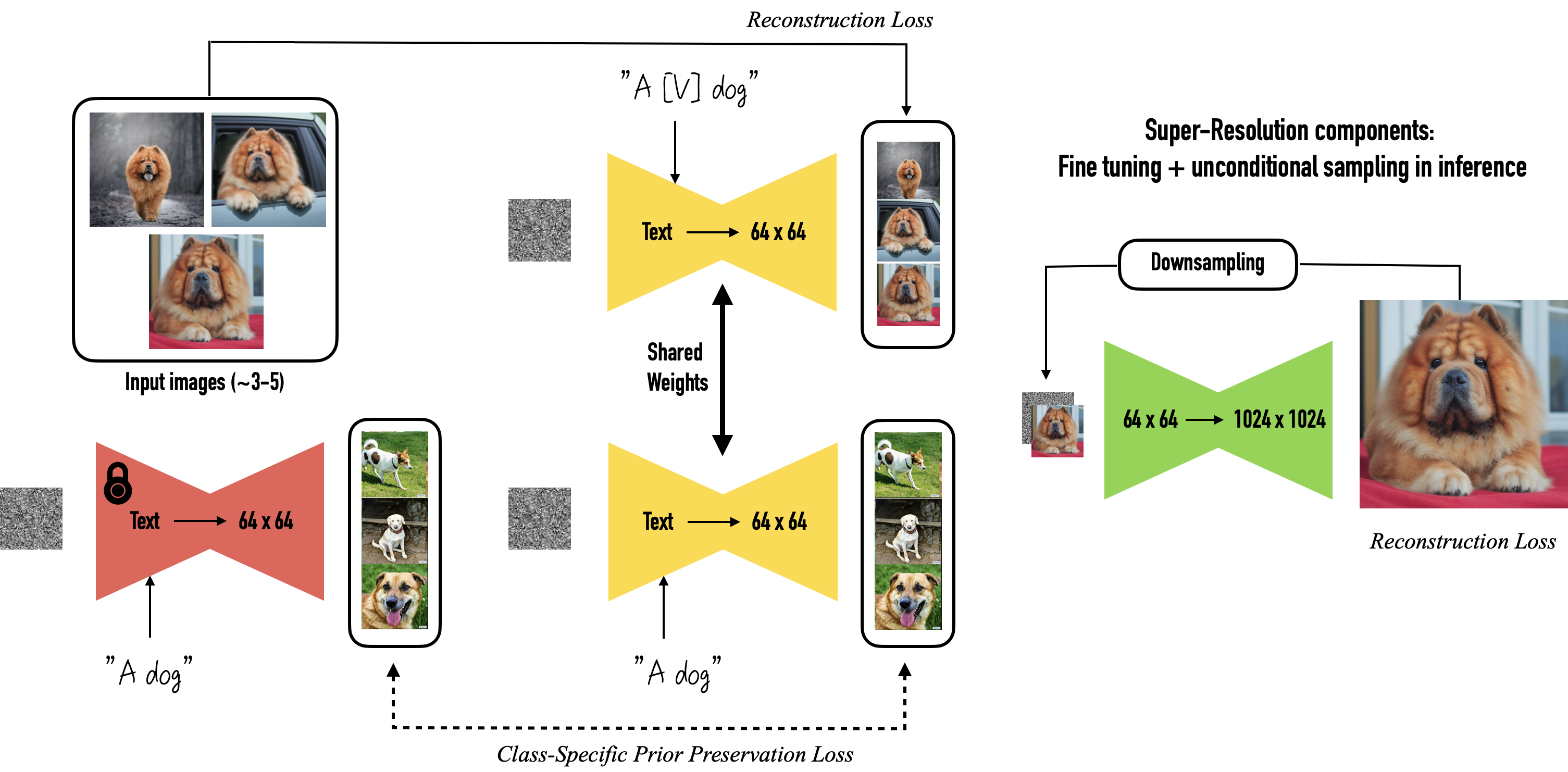
Given ~3-5 images of a subject we fine tune a text-to-image diffusion in** two steps**:(a) fine tuning the low-resolution text-to-image model with the input images paired with a text prompt containing a unique identifier and the name of the class the subject belongs to (e.g., “A photo of a [T] dog”), in parallel, we apply a class-specific prior preservation loss, which leverages the semantic prior that the model has on the class and encourages it to generate diverse instances belong to the subject’s class by injecting the class name in the text prompt (e.g., “A photo of a dog”). (b) fine-tuning the super resolution components with pairs of low-resolution and high-resolution images taken from our input images set, which enables us to maintain high-fidelity to small details of the subject. 给定约 3-5 个主题的图像,我们分两步微调文本到图像的扩散:(a) 使用与包含唯一的文本提示配对的输入图像微调低分辨率文本到图像模型标识符和主题所属类的名称(例如,“[T]狗的照片”),同时,我们应用特定于类的先验保存损失,它利用模型在类并鼓励它通过在文本提示中注入类名(例如“狗的照片”)来生成属于主题类的不同实例。 (b) 使用从输入图像集中获取的低分辨率和高分辨率图像对来微调超分辨率组件,这使我们能够保持对象小细节的高保真度。
Dreambooth实战 #
Dreambooth in Diffusers [10] #
### download pic
from huggingface_hub import snapshot_download

local_dir = "./dog"
snapshot_download(
    "diffusers/dog-example",
    local_dir=local_dir, repo_type="dataset",
    ignore_patterns=".gitattributes",
)

### training
###  在modelscope上运行有问题,连不上huggingface
export MODEL_NAME="CompVis/stable-diffusion-v1-4"
export INSTANCE_DIR="dog"
export OUTPUT_DIR="path-to-save-model"

accelerate launch train_dreambooth.py \\
  --pretrained_model_name_or_path=$MODEL_NAME  \\
  --instance_data_dir=$INSTANCE_DIR \\
  --output_dir=$OUTPUT_DIR \\
  --instance_prompt="a photo of sks dog" \\
  --resolution=512 \\
  --train_batch_size=1 \\
  --gradient_accumulation_steps=1 \\
  --learning_rate=5e-6 \\
  --lr_scheduler="constant" \\
  --lr_warmup_steps=0 \\
  --max_train_steps=400 \\
  --push_to_hub
# examples/dreambooth/train_dreambooth.py
### 把prior loss加到instance loss上

                if args.with_prior_preservation:
                    # Add the prior loss to the instance loss.
                    loss = loss + args.prior_loss_weight * prior_loss
dreambooth in Diffusers examples[11] #
                if args.with_prior_preservation:
                    # Chunk the noise and noise_pred into two parts and compute the loss on each part separately.
                    noise_pred, noise_pred_prior = torch.chunk(noise_pred, 2, dim=0)
                    target, target_prior = torch.chunk(target, 2, dim=0)

                    # Compute instance loss
                    loss = F.mse_loss(noise_pred.float(), target.float(), reduction="none").mean([1, 2, 3]).mean()

                    # Compute prior loss
                    prior_loss = F.mse_loss(noise_pred_prior.float(), target_prior.float(), reduction="mean")

                    # Add the prior loss to the instance loss.
                    loss = loss + args.prior_loss_weight * prior_loss
                else:
                    loss = F.mse_loss(noise_pred.float(), target.float(), reduction="mean")

                accelerator.backward(loss)
参考 #
Dreambooth 原理 #
1xx. DreamBooth 论文精读+通俗理解【论文精读】Dreambooth:diffusion生成模型微调方法 V
Dreambooth 实战 #
-
dreambooth Diffusers examples on Colab 运行过 Initial setup Settings for teaching your new concept Teach the model the new concept (fine-tuning with Dreambooth) Run the code with your newly trained model
1xx. + Unit 3: Stable Diffusion
1xx. Dreambooth V 【只训练unet】